Home Page
AR Page Cartridges Case Gauges Headspace Information Marlin Lever Guns Service Rifle Loadings
Downloads Page Chamber Test Loading Precision M1 Garands Powder Primers Sight Tools
Rimfire Images 10 Images 11 Images 12 Images 13 The 45 Page The Big Dig Scales M1A
Grams Grains Converter
is a basic weight units converter
Speed Fan is a computer program for monitoring temperatures.
Recoil Calculator is a basic rifle recoil calculator program.
Voltage Comparatorss PDF Experiment.
My Comport Test is a small program for use testing a RS232 comport.
PID Loop Example 2 is the same as the below but includes the source code (VBP) as done originally in VB6.
Watt Hour Simulator is a program written to simulate a watt hour metering system. Voltage and Current are set using Vertical Scroll Bars and the program runs on a timer function.
Thermocouple Tables is a listing of all the popular thermocouple types and their milli-volt outputs for Degrees F and Degrees C.
Cal Program is part of an example using VB6 to connect to an MS Access DB and open MS Word files.
PID Loop Example is an example of a PID control loop for industrial applications using a water tank as an example. This program was originally written by Max Seim of the 3M Corporation. The source code is not included. If you want it email me.
Comm DTR Out is a small program to toggle the RS232 DTR pin low to high with a 500 mSec pulse.
Brew Tap is a small program example of vending beer from a tap.
MSCOMM Data Logger This file is a small program designed to read pulses into the MSCOMM Port (RS232 port) on pin #8. Each high pulse is counted and displayed. Additionally the program creates a text file in the root of the C:\ drive and prints the data to it.
MSCOMM FRM Missing Form from Below.
MSCOMM Logoff File is similar to the below file. However, when pin 1 is made high of the RS232 port Windows will log off the current user. The source code and all VB6 files are included including the executable program file. This may not run doing the logoff on all versions of Windows, It was tested on XP and Vista.
Comm Port I/O Test is a simple program to test the DCD, DSR and CTS inputs of a RS232 Comm Port as well as the RTS and DTR outputs.
SSR Relay SSR Relay Data Sheet.
DI 148 Sample Program This zip folder contains a basic program for reading from a Dataq DI-148 starter kit module. Click the link and download the zip file to your desktop. Then right click the file and choose Extract All and a new folder will be created on the desktop. Open the folder and double click the .EXE (Executable) file to install. This program may be easily uninstalled from Add/Remove programs in the Control Panel. The program only runs with a DI-148 module attached via the USB port!
WINSETUPUSB This zip file folder contains winsetupusb used to install Windows XP from a USB Drive (Thumbdrive). Download the file and extract the contents to install.
567 Tone Decoder Ckts. This PDF is from the Archer (Radio Shack) Engineer's Notebook that I likely bought around 1982. The book and credit for the circuit goes to Forrest M. Mimms III.
SAD1024 PDF This PDF is from the Archer (Radio Shack) Engineer's Notebook that I likely bought around 1982. The book and credit for the circuit goes to Forrest M. Mimms III.
Scan Test Stuff is a folder containing the results of scanning some images and saving as .jpg files as well as .pdf documents, there also a few photographs of documents. If nothing else, the Brisket Recipe is very good if taylored to your taste.
ResKit for Windows '98. This is a resource kit for Windows 98!
My Process Killer is a small (about 0.5 MB) program for stopping a running process on a Windows XP or Windows Vista machine. This is a variation of the below Process Kill program designed to be downloaded as a .zip file. Download the zip folder to your desktop, right click and extract the files. Double click on Setup to install the program. The program has an uninstaller and can be removed from Add/Remove programs in the XP control panel or in the Vista Control Panel Programs and Features. Scroll down to the Download Instructions below if you aren't sure how to download the file and extract it.
Themes Control is a part of an ongoing little project. The files in the zip folder were created in VB.NET 2008 Express. Unless you have VB.NET don't even think about downloading this file. :)
My Temp. Converter is a very basic temperature conversion tool used to convert temperatures. The user simply enters a numeric value representing a temperature in the open top text box and reads the temperature express in Degrees C or Degrees F in the lower boxes.
Basic Math is a Visual Basic.NET sample Program. Originally in Visual Basic.NET 2003 version.
Cookbook is a pretty cool cookbook with some favorite restaurant recipes in a .pdf format.
SSPIPES.SCR The old 3D Pipes screensaver
This old classic screensaver works in Vista. Simply download the .zip file, extract it, right click the file and choose install.
The temperature converter is a simple download zip file. Download the file to a convenient location and have windows open the file. Run the setup.exe from the unzipped folder.
Hyper Terminal Download The old classic Microsoft Terminal Emulator.
VB Serial Port Send Receive A Program written in VB 2017 to send/receive data from an Arduino Uno or Mega
Download Instructions
Click a file link above and then...
When given the option to Open or Save choose Save.
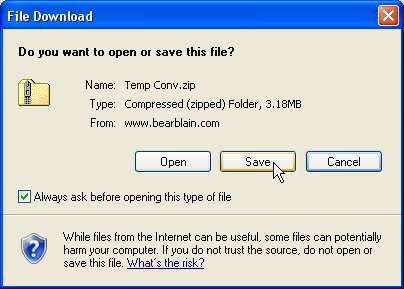
Save the file to a simple location like your desktop.
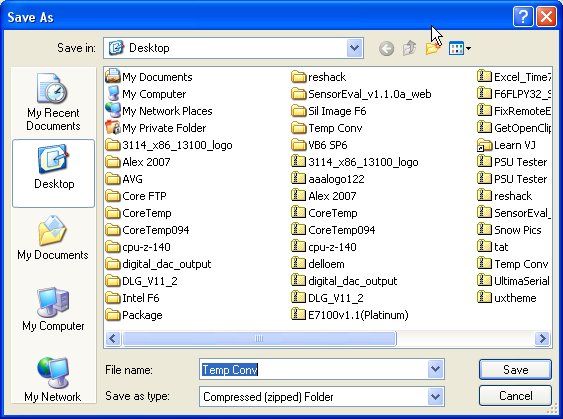
The saved file will look like this:

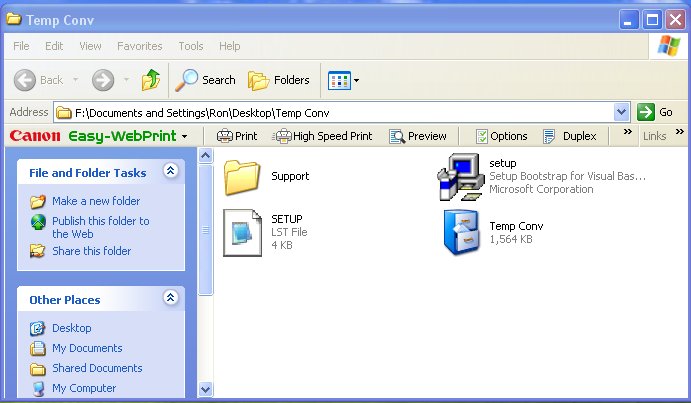
Right click on the .zip folder and choose Extract. You will now have a folder that looks like this:

Double click and open the folder, then double click on the setup Icon.
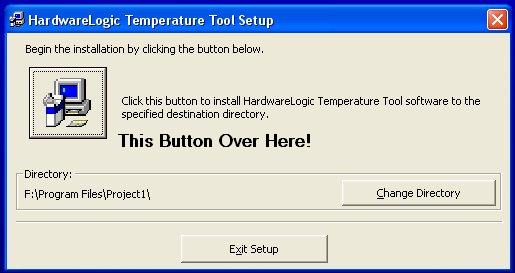
The program will begin the install:
When prompted click the button on the installer to install. Click the button with the ICON!